+30 2810 237502 ▾


2-Position Rotary Switch for CNC Control Panels 10,00 € (inc VAT)

SN04-N2 Proximity Sensor for CNC Limit Switches 12,00 € (inc VAT)
SN04-N Inductive Proximity Sensor for CNC Axes
12,00 € (inc VAT)
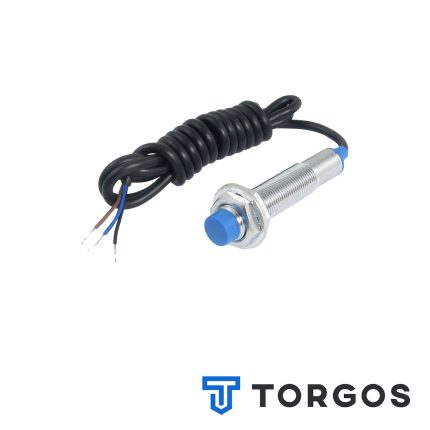
The SN04-N inductive proximity sensor is an NPN switch that detects metal targets without contact, ideal for limit and home switch duties on CNC axes. Its threaded body allows quick mounting and position adjustment on routers, mills and gantry machines.
Περιγραφή
The SN04-N inductive proximity sensor is a non-contact switch that detects metal targets, built for CNC builders and technicians who need a reliable way to trigger a controller input without mechanical wear.
The N in the name marks it as an NPN output device: NPN sensors pull the signal line low when triggered, and pairing one with a PNP-wired controller input will not register a signal, so check this before ordering.
Features of the SN04-N Inductive Proximity Sensor
Inside the housing, the sensor generates a small electromagnetic field at its face. When a metal target enters that field, the internal circuit flips the output state and sends a signal to the controller. There are no moving parts, so switching does not degrade with repeated cycles the way a mechanical contact does.
The body is a threaded cylindrical barrel that mounts through a bracket and locks with a pair of fixing nuts. This makes fine adjustment of the trigger position straightforward once fitted, without redrilling the bracket.
- Inductive, non-contact detection of metal targets
- NPN output, matched to controllers wired for NPN-type inputs
- Threaded cylindrical body for adjustable, lockable mounting
- No mechanical wear, unlike lever or push-button switches
- Suitable for continuous duty as a limit or home switch
- Low-cost alternative to mechanical proximity switches
Where it’s used
On CNC routers and mills, the SN04-N inductive proximity sensor is usually fitted at the end of axis travel, acting as a limit switch that stops a crash, or as a home switch giving the controller a repeatable reference point at power-up. It works equally well on gantry machines, plasma tables and laser cutters.
Because it needs no physical contact, it also suits spots where a mechanical switch would be awkward to reach, such as inside a linear rail carriage. For sensors, drivers and other axis hardware for the same build, browse the rest of the range in our CNC parts shop.
What to check before buying
The first thing to confirm before choosing the SN04-N inductive proximity sensor is output type: this is the NPN variant, needing a controller or breakout board input configured for NPN sensors. Fitting an NPN sensor to a PNP-only input, or the reverse, is a common reason a home switch never triggers even though the sensor itself is working.
Second, check the thread size against the mounting bracket, since the sensor is secured with nuts either side of a plate rather than screws through a housing. It is also worth confirming the supply voltage the controller provides matches what the sensor expects, since running it outside its rated range can shorten its life.
Installation and maintenance
Mount the SN04-N inductive proximity sensor through the bracket, position the target flag or axis component in front of the sensing face, and lock it with the two nuts at the correct trigger point. Wire it following an NPN diagram, taking care with polarity, since inductive sensors are DC devices that a reversed supply can damage. The Wikipedia entry on proximity sensors covers the underlying principle.
Maintenance is minimal because there is no contact to wear out, but metal dust and swarf from milling can build up on the sensing face and cause false triggering. A quick wipe during routine cleaning keeps it working reliably, and it is worth re-checking the trigger position after any bracket adjustment or crash.
FAQ
What does the N in SN04-N mean? It marks the sensor as an NPN output type, so the output pulls low when a metal target is detected, rather than switching high as a PNP sensor would.
Is the SN04-N inductive proximity sensor suitable for both limit and home switch duty? Yes, the same sensor can perform either role, or both on different axes, since the function is defined by how it is wired and where it is mounted.
Does it need any external components to work? No additional circuitry is required beyond matching it to an NPN-compatible input and supplying the correct DC voltage; a pull-up or pull-down is normally already handled by the controller’s input circuit.
Reviews (0)
Shipping & Delivery


Αποστολή & Παράδοση
Όλες οι παραγγελίες αποστέλλονται με ACS Courier και παραδίδονται σε 1-3 εργάσιμες ημέρες.
Κόστος αποστολής:
- Αποστολή: €5,80
- Αντικαταβολή: €5,50
- Δωρεάν αποστολή για παραγγελίες άνω των €100
Ογκώδη δέματα:
Για ογκώδη ή βαριά δέματα η αποστολή πραγματοποιείται μέσω μεταφορικής εταιρείας με χρέωση στον παραλήπτη.
Αποστολές εκτός Ελλάδας:
Πραγματοποιούνται κατόπιν συνεννόησης. Επικοινωνήστε μαζί μας για περισσότερες πληροφορίες.





Reviews
There are no reviews yet.