+30 2810 237502 ▾



CW-5200 Laser Chiller for CO2 Cutting Machines 807,00 € (inc VAT)
M4 Stainless Button Screw ISO 7380 A2 Socket Head Price range: 0,24 € through 0,31 € (inc VAT)
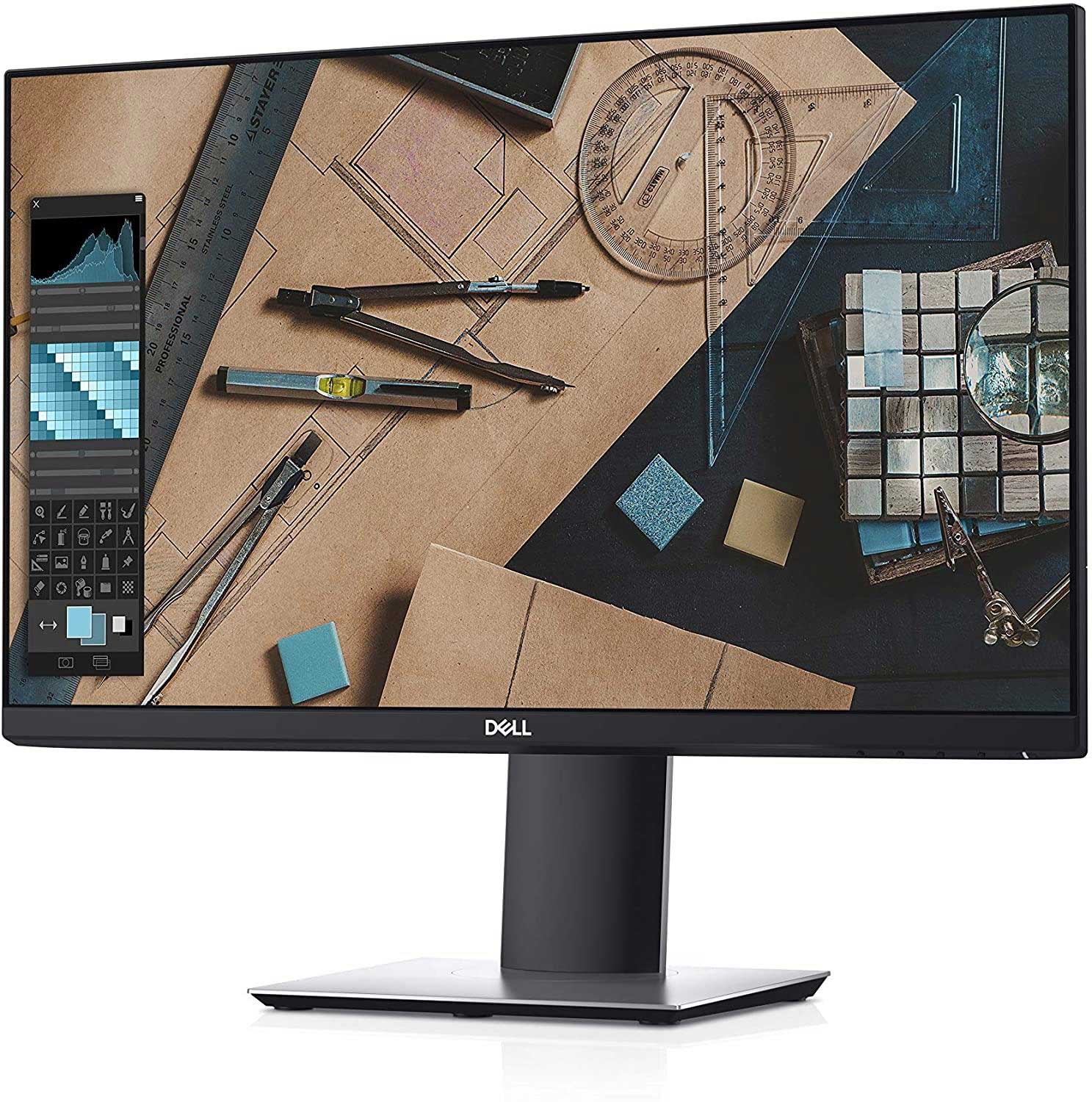
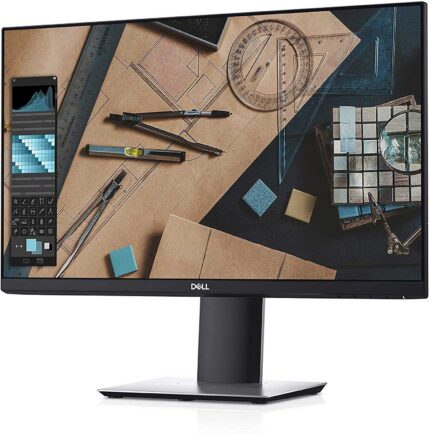
Dell P2319H Monitor: 23-Inch Full HD IPS Display
140,00 € (inc VAT)
The Dell P2319H monitor is a 23-inch Full HD IPS display with an adjustable stand. It suits CAD/CAM workstations and CNC control PCs where accurate, stable colour matters. VGA, HDMI and DisplayPort inputs cover most existing setups.
Περιγραφή
The Dell P2319H monitor is a 23-inch Full HD display built for people who spend long hours in front of a screen and need consistent, accurate colour. Its IPS panel keeps images stable from wide viewing angles, useful when checking G-code parameters or comparing a CAD drawing against a printed cut sheet.
This monitor suits technicians, draughtsmen and machine operators who run CAD/CAM software or CNC control interfaces daily. At 1920×1080 resolution it renders small text and fine drawing lines cleanly without needing a demanding graphics card, making it a practical fit for a control PC beside a router or lathe.
| Brand | Dell |
|---|---|
| Screen | 23″ |
| Panel Technology | IPS |
| Aspect Ratio | 16:9 |
| Resolution | 1920 x 1080 |
| Refresh Rate | 60Hz |
| Brightness | 250 cd/m² |
| Response Time | 5ms (Typical) |
| Contrast Ratio | 1000:1 (Typical) |
| Pixel pitch | 0,265mm |
| Viewing Angle | Horizontal: ±178° / Vertical: ±178° |
| Connectivity | 2x USB 3.0, 2x USB 2.0, DisplayPort, HDMI, VGA |
| Adaptive Sync | No |
| Speakers | No |
| Part Number | P2319H |
Features
The Dell P2319H monitor pairs a matte IPS panel with a stand that adjusts for height, tilt and pivot, so it sits as a second or third screen on a busy workbench without an awkward neck angle. Anti-glare hard coating keeps reflections down under workshop lighting.
Connectivity covers the standard inputs found on most control PCs, and the built-in USB hub lets a keyboard, mouse or USB stick plug in directly at the screen. Key points:
- 23-inch IPS panel, 1920×1080 Full HD resolution
- Height-adjustable stand with tilt, swivel and pivot
- Wide viewing angles with consistent colour and contrast
- VGA, HDMI and DisplayPort video inputs
- Built-in USB 3.0 hub for keyboard, mouse or storage
- VESA mount compatible for arm or wall mounting
Where the Dell P2319H monitor is used
Machine shops fit this screen next to CNC routers, mills and plasma tables as the display for the control PC running Mach3, LinuxCNC or similar software, where clear text and stable colour make it easier to read coordinates, tool offsets and alarm messages at a glance. Draughtsmen and CAM programmers use the same panel on a design workstation, since IPS technology keeps a drawing consistent from the side.
This Dell P2319H monitor also works well as a general office or workshop screen for quoting, invoicing and browsing supplier catalogues alongside CNC software. Anyone assembling a control station from spare parts can browse the wider CNC parts and accessories shop for the rest of the setup.
What to check before buying
Confirm the video output on the control PC before ordering: the Dell P2319H monitor accepts VGA, HDMI and DisplayPort, so an older machine with only VGA needs no adapter. Desk space matters too — measure the depth available, since the stand needs room to move when height or tilt is adjusted.
Buyers replacing an older monitor should also check the VESA mounting pattern of any existing arm or bracket, since not every mount matches a 100x100mm pattern. If the monitor will sit in a dusty workshop, plan for a case or cover, as the panel and vents are not sealed against swarf or wood dust.
Installation and maintenance
Setup is plug-and-play: connect power and a video cable, then use the stand to set height and angle so the screen sits roughly at eye level. The IPS panel technology used in the Dell P2319H monitor needs no calibration for everyday CAD/CAM work, though colour-critical tasks benefit from a basic calibration tool run once.
Cleaning only needs a dry microfibre cloth on the screen, since solvents can damage the coating; workshop dust should be wiped from the vents and stand joints periodically to keep airflow around the electronics. Keep the original stand and cables stored safely in case the monitor is later moved to a different workstation or sold on secondhand.
FAQ
Does the Dell P2319H monitor support wall mounting? Yes, it uses a standard 100x100mm VESA pattern compatible with most monitor arms and wall brackets.
Is the resolution enough for detailed CAD drawings? The 1920×1080 Full HD resolution is sharp enough for everyday CAD/CAM and CNC control work, though very dense drawings may still benefit from a larger or higher-resolution second screen.
Can it be powered directly from a CNC control cabinet? No, it needs a standard mains socket; run its power cable to the same outlet or surge-protected strip as the control PC to keep both on the same circuit.
Reviews (0)
Shipping & Delivery


Αποστολή & Παράδοση
Όλες οι παραγγελίες αποστέλλονται με ACS Courier και παραδίδονται σε 1-3 εργάσιμες ημέρες.
Κόστος αποστολής:
- Αποστολή: €5,80
- Αντικαταβολή: €5,50
- Δωρεάν αποστολή για παραγγελίες άνω των €100
Ογκώδη δέματα:
Για ογκώδη ή βαριά δέματα η αποστολή πραγματοποιείται μέσω μεταφορικής εταιρείας με χρέωση στον παραλήπτη.
Αποστολές εκτός Ελλάδας:
Πραγματοποιούνται κατόπιν συνεννόησης. Επικοινωνήστε μαζί μας για περισσότερες πληροφορίες.






Reviews
There are no reviews yet.