+30 2810 237502 ▾


3-Flute Aluminium End Mills for CNC Router Milling Price range: 15,50 € through 32,00 € (inc VAT)

NPN Proximity Sensor 12mm NO for CNC Machines 11,00 € (inc VAT)
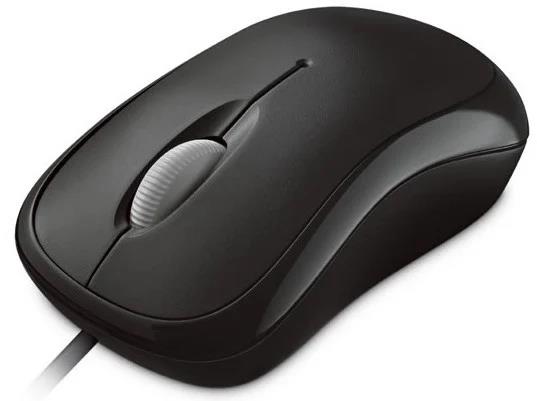
Optical USB Mouse in Black for CNC Workshop PCs
8,00 € (inc VAT)
A simple optical USB mouse in black, ready to use with any CNC control PC or workshop laptop. It connects instantly with no drivers required, making it an easy spare to keep on hand.
Περιγραφή
The optical USB mouse in black is a straightforward pointing device built for everyday use next to a CNC control computer, CAM workstation, or general workshop PC. It works over a standard USB connection, drawing power directly from the port with no batteries or extra cables to manage.
This model suits anyone who needs a dependable mouse on the shop floor, in a CAD/CAM office, or on a machine’s control cabinet PC, where dust and quick swaps matter more than gaming features. It is a functional, no-frills tool rather than a specialised input device.
| Connectivity | Wired USB |
|---|---|
| Sensor Type | Optical |
| Color | Black |
Features of the optical USB mouse
Like most optical mice, this unit uses an LED sensor to track movement on almost any flat surface, removing the rolling ball and dust problems of older mechanical mice. It plugs into a standard USB-A port and is recognised automatically by Windows, macOS, and Linux without extra drivers.
The black housing hides scuffs and grease marks better than lighter colours, which is a practical advantage in a workshop environment where hands are not always clean. The layout keeps things simple, matching what most CNC and CAD software expects for selecting, panning, and zooming on screen.
- Optical sensor tracking on most flat, matte surfaces
- Plug-and-play USB-A connection, no drivers needed
- Black housing that hides dust and grease marks
- Standard two-button and scroll-wheel layout
- Lightweight design for quick swaps between shared PCs
Where it’s used
An optical USB mouse like this one is commonly kept next to the control PC of a CNC router, laser cutter, or plasma table, used for navigating menus, loading G-code files, and adjusting settings in the machine control software. It also works well as a spare mouse for a CAM workstation running Fusion 360, VCarve, or similar design software.
Because it needs no special drivers or calibration, it’s an easy choice for workshops that keep a stock of accessories on hand for replacing worn peripherals or setting up a new station. You can browse the full accessories range in the CNC parts and accessories shop alongside other workshop essentials.
What to check before buying
Before ordering, confirm that the target computer has a free USB-A port; this optical USB mouse does not include a USB-C adapter, so machines with only USB-C ports will need one separately. It is a wired mouse, so also check that the cable reaches comfortably from the port to where you sit or stand while working.
A common mistake is assuming every optical mouse works on glass or highly reflective surfaces; like most optical sensors, this one performs best on a matte mouse pad or plain desk surface. If your control cabinet has limited desk space, pair it with a small mouse pad rather than relying on a metal or glass panel.
Installation and maintenance
Setup is immediate: connect the USB cable to a free port and the operating system installs a generic driver automatically, with nothing to download. If the cursor doesn’t move, try a different USB port before assuming the optical USB mouse is faulty, since some hubs or extension cables provide insufficient power.
For maintenance, wipe the sensor window and the underside of the mouse from time to time, since workshop dust and metal shavings can interfere with tracking accuracy; the sensor works by reading light reflected off the surface beneath it, a method explained in more detail on the Wikipedia entry on optical mice. Keeping the mouse pad or desk surface clean does more for long-term reliability than any other single step.
FAQ
Does this optical USB mouse need a driver installed? No, it uses the standard HID driver built into Windows, macOS, and Linux, so it works as soon as it’s plugged in.
Will it work with a USB-C laptop? Only with a USB-C to USB-A adapter, since the mouse itself has a standard USB-A connector.
Is it suitable for CAD/CAM software? Yes, the two buttons and scroll wheel cover the basic click, pan, and zoom functions used in most CNC control and design programs.
Reviews (0)
Shipping & Delivery


Αποστολή & Παράδοση
Όλες οι παραγγελίες αποστέλλονται με ACS Courier και παραδίδονται σε 1-3 εργάσιμες ημέρες.
Κόστος αποστολής:
- Αποστολή: €5,80
- Αντικαταβολή: €5,50
- Δωρεάν αποστολή για παραγγελίες άνω των €100
Ογκώδη δέματα:
Για ογκώδη ή βαριά δέματα η αποστολή πραγματοποιείται μέσω μεταφορικής εταιρείας με χρέωση στον παραλήπτη.
Αποστολές εκτός Ελλάδας:
Πραγματοποιούνται κατόπιν συνεννόησης. Επικοινωνήστε μαζί μας για περισσότερες πληροφορίες.
Related products
Dust Shoe for Water-Cooled CNC Spindles — Ø80 & Ø100mm
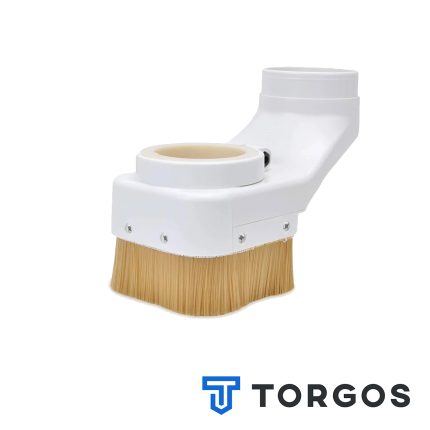
This dust shoe fits around a water-cooled CNC spindle, enclosing the spindle body and its cooling tubes without restricting movement. Perimeter brushes seal against the workpiece while a side port connects to a shop vacuum or central dust extraction line. It keeps the work area visible and free of chips during wood, MDF, and plastic routing.





Reviews
There are no reviews yet.